 Jam Jam
Free · works in your browser · a free account keeps your songbook in sync
Import a song into your songbook
To import a song into Jam Jam, open the songbook import and pick the source: a link or a search, a file (PDF, TXT, ChordPro, MIDI, MusicXML, DOCX, ODT, zip) or a photo of a page. Chords and lyrics are laid out again, then the song joins your songbook, ready to transpose and export.
Free account required: the imported song joins your synced songbook.
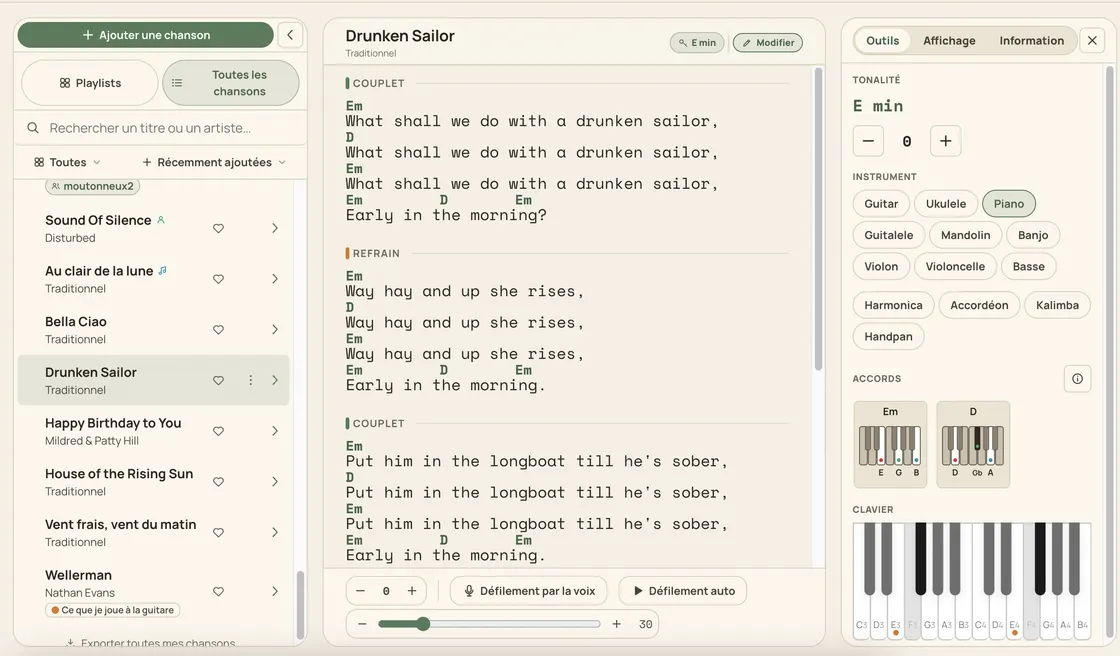
Song import at a glance
- Sources: link, search, pasted text, file, photo or scan.
- File formats: PDF, TXT, ChordPro, MIDI, MusicXML, DOCX, ODT and zip archives.
- Photo or scan: read on the device in the mobile app, on our server in France from the web (20 MB max).
- Free account: 10 imports per week from a link or a search, 50 songs in the songbook.
- Text recognition of a scanned page in 10 languages on the web.
How to import a song
-
Open the songbook import
In your songbook, choose Import: online, file or pasted text.
-
Give the source
Paste a link, search for a title, drop one or more files, or choose a photo of a page.
-
Check the preview
Jam Jam shows the song laid out before adding it; for a multi-page document, pick the pages to keep.
-
Add it to the songbook
If the song already exists, choose to replace it or keep both. It then appears on your other devices within seconds.
Which song files can you import
Jam Jam’s file import accepts chord and lyric sheets as text (TXT, ChordPro), documents (PDF, DOCX, ODT), note files (MIDI, MusicXML) and zip archives bundling several of them. A PDF exported by Jam Jam re-imports losslessly, chords and lyrics to the character. To turn a file from one format into another, the Convert a file page (jam-jam.org/app/convert) does it.
Importing a song from a photo or a scan: what goes to the server
A photo or scan of a songbook page imports on both platforms, but not in the same place. In the mobile app, text recognition runs on your phone and the image never leaves it. On the web, the image or scanned PDF is sent to our own service at jam-jam.org, in France: 20 MB at most, 12 pages per batch, ten recognition languages. The source file is erased as soon as processing ends and is never passed to a third party.
| Source | Where it is processed | Note |
|---|---|---|
| Link or search | Page fetched by Jam Jam | 10 imports per week for free |
| File (text PDF, TXT, ChordPro, MIDI, MusicXML, DOCX, ODT, zip) | Read by Jam Jam, no image recognition | Not counted as an import on the web |
| Pasted text | In your browser or phone | Not counted as an import on the web |
| Photo or scan, mobile app | On your phone | The image never leaves the device |
| Photo or scanned PDF, web | Our server in France | 20 MB and 12 pages at most, file erased afterwards |
Importing a song from a link
Paste the address of a chords page or search for a title: Jam Jam recognises the layout of many tab sites and rebuilds the chords above the lyrics. A YouTube link is used to find the song’s title. With a free account, 10 imports per week go this way, counter reset on Monday; Premium makes them unlimited.
If the search finds nothing on these sites, Deeper search also looks at other sites: from our server in France on the web, from your phone in the app. It is limited to 10 searches per 24 hours per account, Premium included. A page that only has the lyrics is marked “Lyrics only”.
After the import: what happens to the song
An imported song is a songbook song like any other: transpose it from −6 to +6 semitones, take the suggested capo, show diagrams for 26 instruments, file it in playlists, export it as PDF or ChordPro. The free account keeps up to 50 songs.
An imported song is not a mere copy: its chords are understood, so they can be transposed, played on the keyboard and read in your instrument’s diagram.
Import a song →More Jam Jam tools
Import a song FAQ
How do I import a song’s chords from a PDF?
Drop the PDF into the songbook’s file import. A PDF with text is read directly; a scanned PDF goes through text recognition (on our server from the web, 20 MB at most).
Can I import a song from a photo?
Yes. In the mobile app, the photo is read on your phone. On the web, it is sent to our server in France for recognition, then erased.
Which formats are accepted?
PDF, TXT, ChordPro, MIDI, MusicXML, DOCX, ODT and zip, plus pasted text, links and search by title.
How many songs can I import for free?
With a free account: 10 imports per week from a link or a search, and a 50-song songbook. On the web, a file or pasted text does not count towards imports. Deeper search, which also looks at sites Jam Jam does not usually read, is limited to 10 searches per 24 hours per account, Premium included.
Are my files sent to a server?
From the web, a photo or scan of a page always goes through our own service in France, since image recognition does not exist in the browser; a file can also be converted there. Either way, it is never passed to a third party and the source file is erased as soon as processing ends. In the mobile app, a photo is read on the phone.