 Jam Jam
Free · works in your browser · no sign-up
Scales on the online keyboard
Choose a key and the keyboard shows you its scale: in-key notes bright, out-of-key keys greyed, root marked.
- No account
- No ads on the web
- Nothing to install
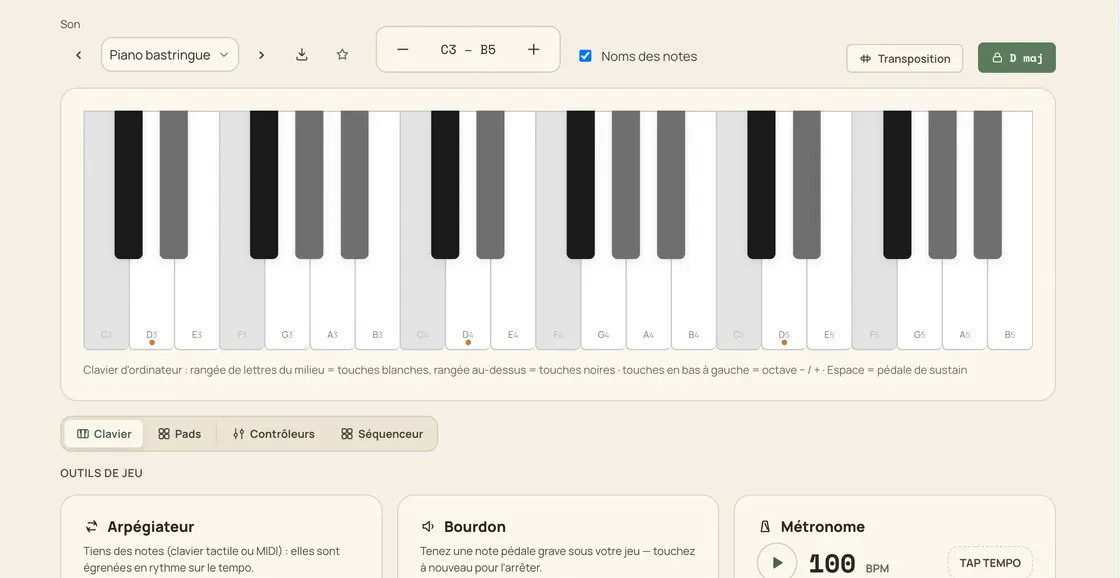
A scale is far easier to learn when you can see it. Lock a key on the Jam Jam online keyboard (any of the twelve roots, major or minor) and the keys tell the whole story: the notes of the scale stay bright, the notes outside it are greyed, and the root carries a small colour dot. Nothing is blocked, so you can still play whatever you want; the keyboard simply shows you where the key lives. And when you do not know the scale yet, work the other way round: tick the notes you are hearing in manual detection and Jam Jam ranks the scales that fit, all 16 of them with their modes, then draws them on a fretboard. Free, in your browser.
How to see a scale on the keyboard
-
Open the keyboard
The virtual piano loads instantly in your browser: nothing to install.
-
Pick a key
Choose major or minor, then the root note: the twelve keys are one tap away.
-
Read the keyboard
In-key notes stay bright, out-of-key keys go grey and the root is marked with a coloured dot.
-
Play in key
Improvise, work a scale or look for a melody: every key stays playable, the highlighting only guides your eye.
A scale you can see, not just read
The whole keyboard follows the key
Pick a root and a mode and every octave is redrawn at once: the scale is under your fingers, not on a chart.
Guided, never restrictive
Out-of-key keys are greyed but stay playable, and the root gets a coloured dot so you always know where home is.
The key comes from your ear
Chord detection reads the key of what you play and the keyboard picks it up in one tap. Or tick the notes you hear by hand: Jam Jam scores every scale that fits (major, minor, Dorian, Phrygian, Mixolydian, pentatonics) and shows them on the fretboard.
It stays where you left it
Your key is remembered from one session to the next, and the keyboard’s built-in sequencer follows the same scale.
Why practise scales here
- Major and minor in all twelve keys, one tap away
- Out-of-key notes greyed, root marked: the scale is visible
- Import the key heard by chord detection
- Free, in your browser, no sign-up: also on Android

Theory stops being abstract the moment you can see it: 16 scales and their modes, drawn on 26 diagram instruments (guitar, ukulele, mandolin, handpan, kalimba) and backed by 379 fingerings written by hand rather than generated. In the browser, and offline in the Android app.
Open the keyboard →More Jam Jam tools
Scales FAQ
Which scales can I display?
The online keyboard highlights the major and the minor scale of any of the twelve roots: the two that carry the vast majority of songs. To go further, manual detection ranks the 16 scales against the notes you pick, modes and pentatonics included.
Does it stop me playing out-of-key notes?
No. Out-of-key keys are simply greyed; they stay perfectly playable, because a passing note outside the scale is often exactly what a melody needs.
How do I know the key of a song?
Let the Jam Jam chord detector listen: it reads the key while it names the chords, and the keyboard picks that key up in one tap.