 Jam Jam
Free · works in your browser · no sign-up
Free online metronome
A steady metronome in your browser: tempo, time signature, accents and tap tempo.
- No account
- No ads
- Nothing to install
In short
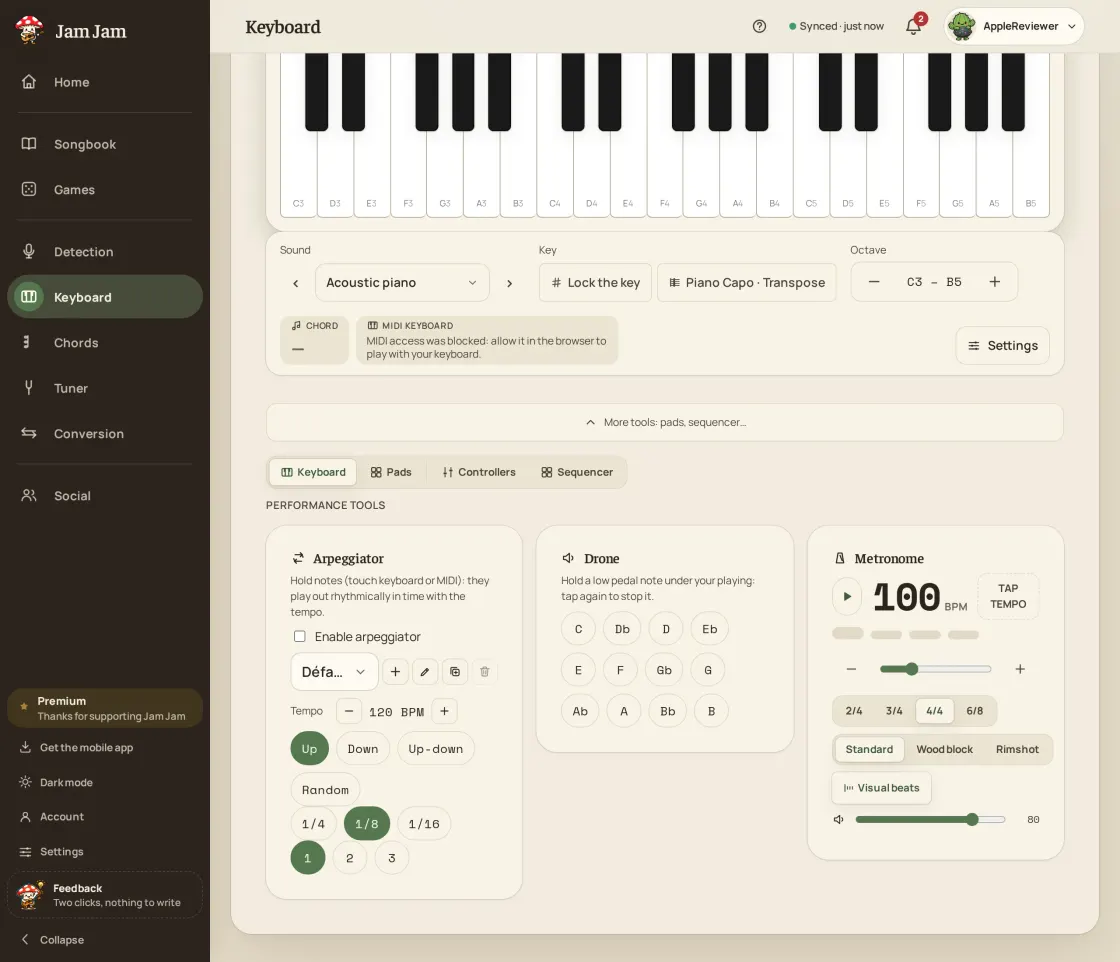
To set an online metronome, open the Jam Jam Keyboard page, pick a tempo from 30 to 300 BPM with the slider, the ± buttons or by tapping the beat, then a time signature: 2/4, 3/4, 4/4 or 6/8. The downbeat is accented. Clicks run on the browser audio clock, so the tempo does not drift.
- 30 to 300 BPM, set to the exact BPM or by tap tempo (an average of your taps).
- 4 time signatures: 2/4, 3/4, 4/4 and 6/8, with a second accent on beat 4 in 6/8.
- 3 click sounds (standard, wood block, rimshot) and a dedicated volume.
- Tempo, time signature and sound kept on your device between visits.
The Jam Jam metronome keeps your tempo right in your browser. Set any speed from 30 to 300 BPM with the slider, the ± buttons or tap tempo, pick a time signature from 2/4 to 6/8, and the first beat is accented so you always hear where the bar starts. Three click sounds (standard, wood block and rimshot) a volume of its own and a row of beat dots that follow the click let you see the pulse as well as hear it. It sits on the Jam Jam keyboard page, so the metronome and a playable piano share the same screen. No download, no account.
How to use the online metronome
-
Open the keyboard page
The metronome sits on the Jam Jam keyboard page: nothing to install, it starts on your first click.
-
Set the tempo
Drag the slider, use the ± buttons to move one BPM at a time, or tap the tempo button in time with the music.
-
Choose the time signature
Pick 2/4, 3/4, 4/4 or 6/8. The first beat is accented, and in 6/8 the fourth beat is accented too.
-
Start and play
Press start, follow the beat dots, and change the click sound or its volume while it runs.
More than a click track
Tap tempo, slider and ± buttons
Find your BPM the way you like: tap along with a song, drag the slider, or step one beat per minute at a time between 30 and 300.
Accents where the bar starts
2/4, 3/4, 4/4 and 6/8: the downbeat is accented, and 6/8 gets its second accent on beat four, so compound time actually feels right.
Three click sounds, your volume
Standard, wood block or rimshot, each with its own volume: the same three timbres as the metronome in the mobile app.
It does not drift
Clicks are scheduled against the browser’s audio clock rather than a plain timer, so the tempo stays locked however long you play.
Why this metronome
- 30 to 300 BPM: slider, ± buttons and tap tempo
- 2/4, 3/4, 4/4 and 6/8 with an accented first beat
- Three click sounds and a volume of its own
- Free, in your browser, no sign-up: also in the Android app

A tempo on its own never finished a song: set your BPM here, keep the chords open in the notebook next door, and on Android let the lyrics scroll by themselves while you sing. From the first click to the last verse, in the browser and offline in the Android app.
Open the metronome →Related guides
More Jam Jam tools
Metronome FAQ
Is the online metronome free?
Yes: free, with no sign-up and no ads. It runs entirely in your browser, and your tempo, time signature and click settings are kept on your device for next time.
Can I set the tempo by tapping?
Yes. Tap the tempo button a few times in time with the music and the metronome averages your taps to work out the BPM.
Where do I find the metronome?
It is on the Jam Jam keyboard page, so you can practise with a playable piano on the same screen. The Jam Jam app for Android has a metronome too.