 Jam Jam
Free · works in your browser · a free account keeps your songbook in sync
Read a tab that actually plays
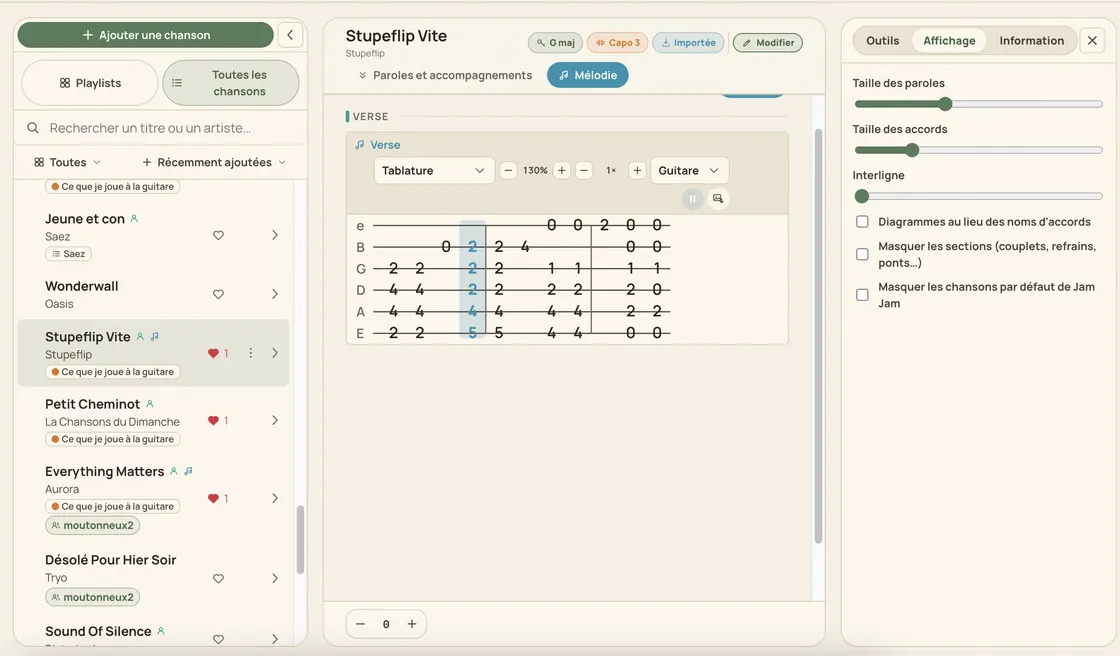
Paste a tab you found on a forum: Jam Jam reads it, plays it at your speed and can show it on a staff instead.
- No account
- No ads
- Nothing to install
In short
To play a tab online, paste the ASCII tab (e|--0-2--|) into the Jam Jam songbook: it becomes a playable melody, with a cursor that follows note by note and a speed from ×0.5 to ×2. 18 instruments are read in their real tuning, up to fret 24. A free account is enough.
- 18 tab instruments, each in its real tuning.
- 11 views of the same melody: tab, staff, falling notes, note names and more.
- 8 melody notations recognised automatically, ASCII tab included.
- Playback from ×0.5 to ×2 in steps of 0.25, frets up to 24.
A tab found on a forum is frozen text: no sound, no tempo, no way to move it to another key. Paste it into Jam Jam in the usual ASCII format (e|--0-2--|) and it becomes a real melody: 18 tab instruments (guitar, bass, ukulele, guitalele, mandolin, banjo, violin, viola, cello, oud, bouzouki, balalaika, charango, cavaquinho, shamisen, double bass, lap steel, sitar) each in its real tuning, frets up to 24, playback from ×0.5 to ×2 in steps of 0.25 and a cursor that follows note by note. It lands in your songbook, where transposition from −6 to +6 semitones and the capo put it back in your key.
How to read a tab online
-
Paste your tab
Copy the ASCII block from any forum and paste it: the parser recognises the notation on its own.
-
Pick your instrument
Guitar, bass, ukulele, banjo… the tab is re-read in the real tuning of the instrument you choose.
-
Press play
A cursor follows the notes, from ×0.5 to ×2 in steps of 0.25, with zoom from ×0.6 to ×3 for tired eyes.
-
Keep it in your songbook
The melody joins your song: transposable, playable again, and exportable to PDF with the chords and lyrics.
What a tab site does not do
A tab that sounds, not a picture
The usual ASCII format found on forums is parsed note by note: frets, strings and durations become a playable melody, not a frozen screenshot.
Eleven ways to read one melody
Tab, staff, falling notes, note names, harmonica, accordion, handpan, kalimba, harp, mallets, steelpan: switch views without importing anything again. The tab is only a display, never the storage format.
Real tuning for 18 instruments
Guitar, bass, ukulele, guitalele, mandolin, banjo, violin, viola, cello, oud, bouzouki, balalaika, charango, cavaquinho, shamisen, double bass, lap steel and sitar, and the banjo fifth string really starts at fret 5, exactly like on the instrument.
Eight written notations understood
Plain letters, letters with octave, apostrophes, solfège, jianpu, harmonica tab, MIDI numbers, ASCII tab: the parser detects the notation and only asks when two readings are equally likely.
What the reader does
- Frets up to 24, zoom ×0.6 to ×3, fret numbers relative to the capo
- Playback ×0.5 to ×2 in steps of 0.25, with a cursor that follows
- Also imports MIDI, MusicXML, a photo or a PDF of sheet music
- PDF export of the tab: 10 of the 11 views can be printed

A tab site shows you text and stops there. Here the tab is only one view of a melody stored in your songbook: the same song reads on a staff for people who sight-read, transposes from −6 to +6 semitones together with the chords and the fingering diagrams, and leaves as a vector PDF that Jam Jam can re-import without losing a character. That chain (tab, songbook, export) is what a standalone reader never gives you.
Paste a tab →Related guides
More Jam Jam tools
Tab reader FAQ
Is it free?
Yes, with a free account, because your songbook is synced across your devices. The free tier covers 5 imports a week, 50 songs in the songbook and 6 exports a week (PDF and text included; ChordPro, LRC, LAB, MIDI and MusicXML exports are Premium) with every counter resetting on Monday.
Which instruments are supported?
Eighteen: guitar, bass, ukulele, guitalele, mandolin, banjo, violin, viola, cello, oud, bouzouki, balalaika, charango, cavaquinho, shamisen, double bass, lap steel and sitar, each in its real tuning. Long melodies are split into systems, like real sheet music.
What if I only have a photo of the sheet music?
Photograph it or send the PDF: online sheet-music recognition pulls the melody out, allowing up to three minutes of processing on a dense page. MIDI and MusicXML files work too.