 Jam Jam
Free · works in your browser · a free account keeps your songbook in sync
Transpose a song and find your capo
Shift the key by −6 to +6 semitones: chords, melody and fingering diagrams follow, and your lyrics stay untouched.
- No account
- No ads on the web
- Nothing to install
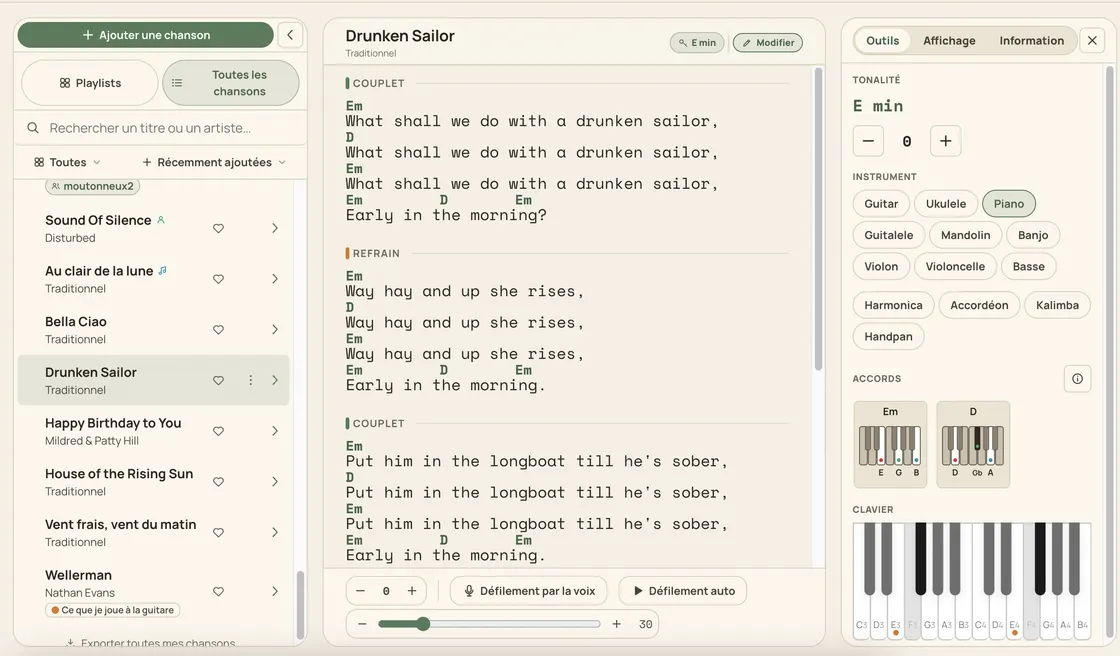
In the Jam Jam songbook, transposing a song takes one gesture: −6 to +6 semitones, all twelve keys, in both directions. Drop a song that sits too high for your voice, or lift it for the singer you are backing. The chords follow (including the bass of slash chords) along with the displayed key, the melody, the fingering diagrams and the synced audio timeline; the lyrics never move a single character. Next to it, the capo calculator places the ideal fret from 0 to 12 on six instruments. A song found by ear in the detector lands in the songbook, drops to your range, then leaves as a PDF.
How to transpose a song
-
Open your song
Pick a song from your songbook, whether it came from an import, from chord detection or from typing it out.
-
Change the key
One semitone at a time, from −6 to +6: chords, melody and diagrams are recomputed straight away.
-
Let the capo settle
The recommendation tries frets 0 to 7 and keeps the one that makes the shapes easiest to play.
-
Play it or export a PDF
Print the real chord next to the shape to finger, or the shapes alone: your call.
Transposition that breaks nothing
A capo position actually computed
Every chord is transposed down across frets 0 to 7, every shape gets a difficulty score and the lowest total wins; on a tie the lower fret takes it: no climbing the neck for nothing.
The all-open badge
When 100% of the chords turn into easy chords with that capo, the whole song plays in open positions: a song written in Bb becomes playable again.
Your chords stay at concert pitch
Chords are always stored at real pitch: the capo only changes the shapes on screen, so nothing gets damaged, and the editor converts a capoed tab back into real chords.
A PDF that speaks to both players
On export, keep the real chord next to the shape to finger (perfect when one of you has a capo and the other does not) or print the shapes on their own.
What transposing carries with it
- −6 to +6 semitones: all 12 keys, in both directions
- Capo 0 to 12, recommended position computed over frets 0-7
- Capo on 6 instruments: guitar, ukulele, guitalele, banjo, mandolin, bass
- Lyrics never move: only the music is transposed

A standalone capo calculator hands you a number and stops there. Here, transposing lives inside your song: chords heard by the detector land in your songbook, you drop them to your voice, the diagrams offer up to six shapes on guitar, guitalele and banjo, the key feeds the scales on the online keyboard, and the exported PDF re-imports without loss. One gesture, and the whole chain follows.
Transpose in the songbook →More Jam Jam tools
Transpose and capo FAQ
Does transposing change the lyrics?
Never. It only touches the music: chords, the bass of slash chords, the displayed key, the melody, the diagrams and the synced audio timeline. Your lyrics stay exactly as written, character for character.
How is the recommended capo chosen?
It evaluates frets 0 to 7, transposes every chord down, scores how hard each shape is and keeps the lowest total. On a tie it prefers the lower fret, and N.C. rests are left out of the calculation.
Do I need an account, and is it free?
A free account is needed, because the songbook syncs across your devices. Transposition and the capo calculator are included, in the browser as well as in the mobile app: which also works offline.