 Jam Jam
Free · works in your browser · a free account keeps your songbook in sync
Your online chord songbook
Import a song, transpose it, pick your fingering, and let the lyrics scroll on their own while you sing.
- No account
- No ads on the web
- Nothing to install
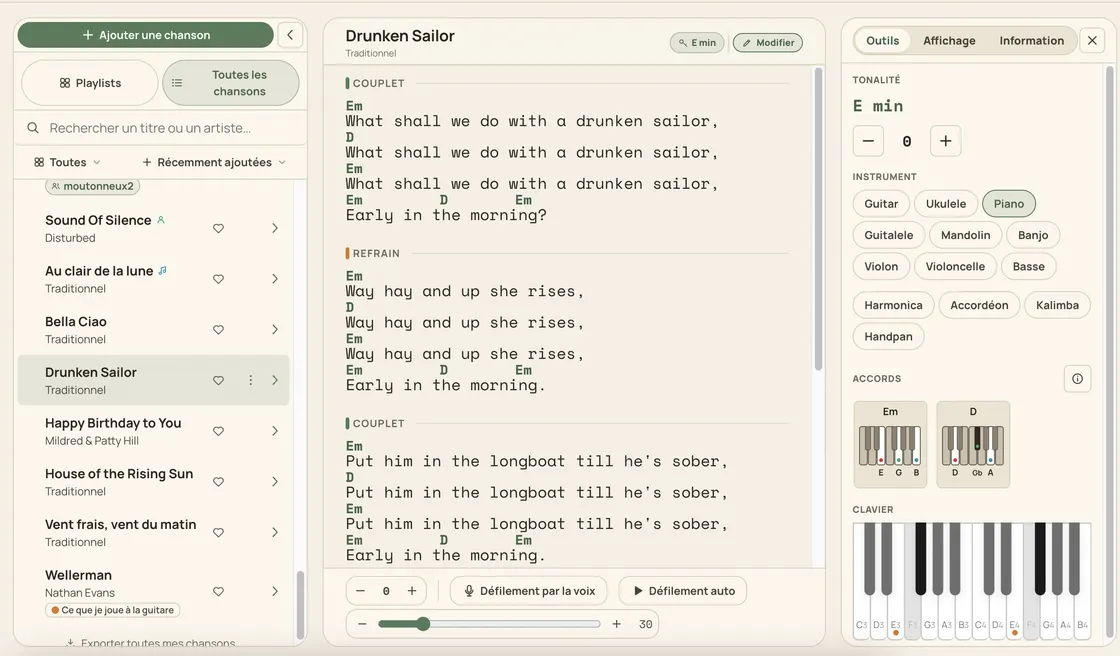
The Jam Jam chord songbook keeps your songs (lyrics and chords aligned) and makes them playable. Import from 23 tab sites, a PDF, a link, a web search, or a photo of a page from the mobile app, then file each song into as many playlists as you like, with a colour and an emoji. Transpose from −6 to +6 semitones, take the capo position Jam Jam works out for you, and show chord diagrams for 26 instruments. What chord detection hears lands in the same songbook, and the PDF you export can be re-imported without losing a thing. A free account is enough: 50 songs, synced between your phone and your browser.
How to build your songbook
-
Import a song
Paste a link, drop a PDF or search the title: 23 tab sites are recognised, chord-over-lyrics layout included.
-
File it in your playlists
One song can live in several playlists at once, and the liked-songs playlist is always there, pinned on top.
-
Fit it to your voice
Transpose −6 to +6, take the suggested capo and show the diagrams for the instrument you actually play. On the web, simplify chords when an easier option is available for your instrument and capo, then click again to restore them.
-
Play it and sing it
The lyrics scroll on their own, or follow your voice while you sing: on the web and on Android.
A songbook that understands your chords
The lyrics follow your voice
You sing, the page follows. It does not transcribe: it aligns the stream of words onto your lyrics (phonetic matching, bigram anchoring so two identical choruses never get mixed up) and greys them out word by word. Web and Android.
A PDF that re-imports losslessly
The exact song data is embedded in the PDF you export: re-import it and the chords and lyrics come back character for character, even from a combined PDF holding a whole playlist.
Playlists a song can share
A song lives in several playlists at once, with no nesting: colour, emoji, manual order, 4 sort modes and 6 filters, and a playlist can be shared on your profile.
Transposition and a worked-out capo
−6 to +6 semitones on the chords, the key, the melody and the diagrams (never on the lyrics) plus a suggested capo fret, scored on how hard the shapes really are.
What the songbook does
- Import from 23 tab sites, a PDF, a link or a web search
- Chord diagrams for 26 instruments, up to 6 guitar positions
- Vector PDF export, clickable index, re-importable losslessly
- 50 songs and 10 imports a week on a free account

A tab site shows you a song; the songbook hands it to you. Here the chords are understood, not just written down: what chord detection hears goes straight to the songbook, the key of a song locks the online keyboard, the diagrams follow the instrument you picked, and a friend can import a song from your profile in one tap. All of it runs in the browser, and offline in the mobile app, where your songbook stays readable with no connection at all.
Open your songbook →More Jam Jam tools
Chord songbook FAQ
Is the songbook free?
Yes, with a free account: 50 songs in your songbook and 10 imports a week, and the counter resets every Monday. The account is needed because the songbook is synced between your phone and your browser. Without it, nothing would follow you from one device to the other.
Can the lyrics scroll while I sing?
Yes, on the web and on Android: Jam Jam aligns what it hears onto the song’s lyrics and greys the words out as you go. On iOS only the automatic scroll, at a speed you set, is available.
Can I bring in songs from another site?
Yes: the importer recognises 23 tab sites and rebuilds the chord-over-lyrics layout, and it also takes a PDF, a link or a search. After that the song is yours. Transpose it, export it, share it with a friend.
Which files can I drop into the web app?
Drop a photo, PDF, audio recording, text document or several files together. Jam Jam reads TXT, ChordPro, OnSong, DOCX, ODT, RTF, PPTX, ODP, XLSX, ODS, CSV, timed lyrics in LRC/SRT/VTT/ASS, MIDI, MusicXML and mixed ZIP archives. Review each file before adding it: unreadable pages and omitted elements are reported. Some formats, large files or codecs require an export to a readable format. Complex scores still need review, especially rhythms and voices.