 Jam Jam
Free · works in your browser · no sign-up
Chord and key detector, free and unlimited in your browser
Drop a song or play into the mic: Jam Jam names each chord among 168 and reads the key and tempo. In your browser, no account, no limit on analyses.
- Free and unlimited in your browser
- No account
- Nothing to install
In short
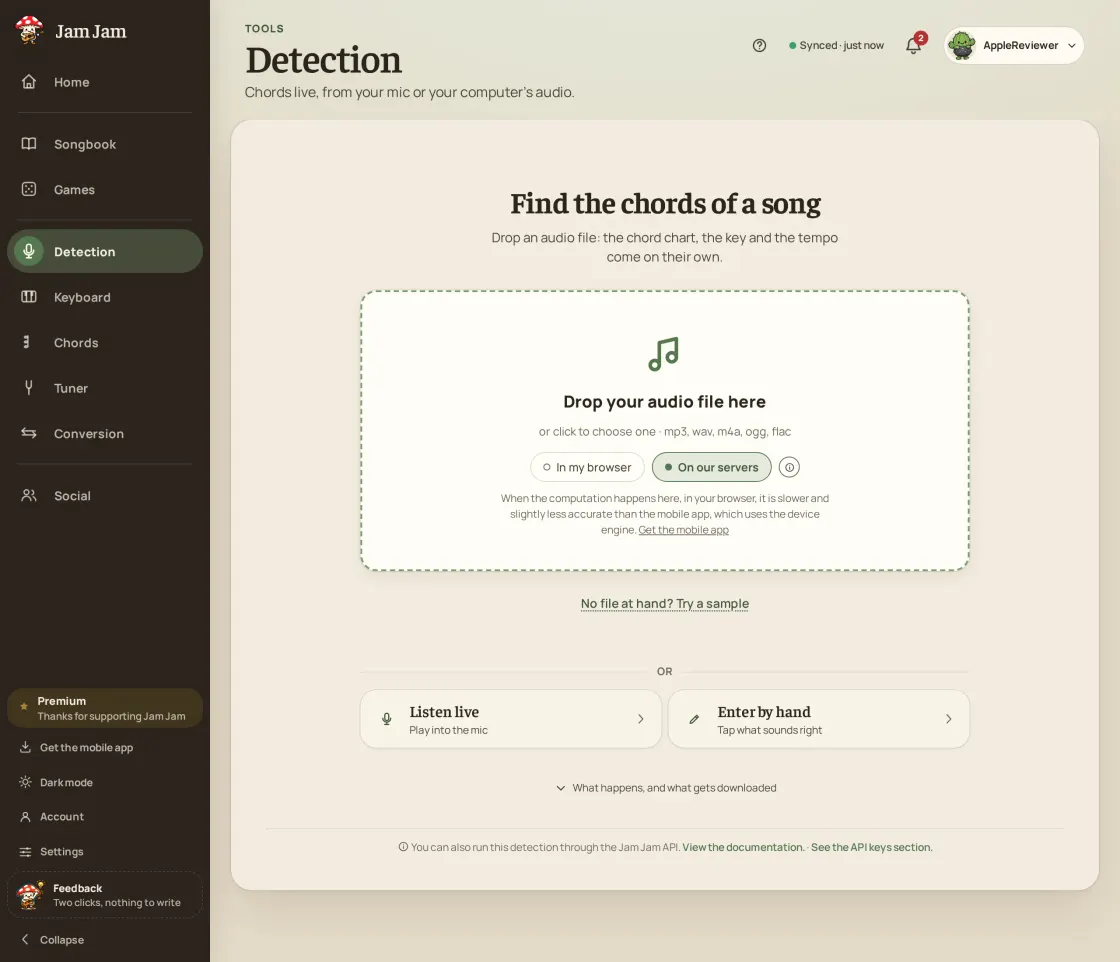
Jam Jam Detection finds the chords, key and tempo of a song. It is free and unlimited in your browser, with no account: drop an audio file or play into the mic. Open Detection, drop an audio file (mp3, m4a, wav, flac…) or start the mic: each chord is named among 168 (14 qualities across the 12 keys) and time-stamped, with the key and the tempo.
- 168 chords recognised: 14 qualities across the 12 keys.
- Three sources: an audio file, your microphone, or the sound of a browser tab.
- Key and tempo (BPM) read at the same time as the chords.
- Your browser does the calculation, with no limit. If our server is free, it takes over to go faster.
- Your microphone is never sent. A file handled by our server is deleted at the latest within 72 hours.
Jam Jam Detection recognises the chords, key and tempo of a song. Give it an audio file (mp3, m4a, wav, flac…), your computer’s microphone or the sound of a browser tab, and it names each chord among 168 (14 qualities across the 12 keys), time-stamped on a timeline you can browse and listen to. Your browser does the calculation, with no limit, and your microphone is never sent anywhere.
How to find the chords and key of a song
-
Drop a file, or start the mic
Drag an mp3, m4a, wav or flac onto the drop zone, or open the mic tab to play yourself or let a browser tab play. Nothing to install, no account.
-
Let the model listen
Your browser does the calculation, with no limit. If our server is free, it takes over to go faster.
-
Read the chords, key and tempo
The chords appear time-stamped on a timeline, with the key and the tempo (BPM). Tap a chord and playback jumps there, so you can check it by ear.
-
Fix it and keep it
Correct a doubtful chord, then send the song to your notebook to transpose it or export it as a PDF.
A chord detector that really listens
Free and unlimited in your browser
Your browser does the calculation, with no limit. If our server is free, it takes over to go faster. Your microphone is never sent anywhere. Nothing to install.
File, microphone or browser tab
Drop a song, play into your computer’s microphone, or let a browser tab play (the sound of a video or a site) to find its chords.
Key and tempo, together
It reads the song’s key and its tempo (BPM) at the same time as the chords.
A real chord model
An embedded model recognises 14 chord qualities across the 12 keys (168 chords) rather than simple templates.
What the detector does
- Time-stamped chords, key and tempo in one pass
- 14 chord qualities on the 12 keys: 168 chords recognised
- Audio file, microphone or browser tab sound
- Free and unlimited in your browser, no account, nothing to install

And then? The result is not a dead end: send it to your notebook, where you fix a chord, transpose for your voice, work out the capo and export a PDF. The key it reads can also lock the online keyboard. A free account only syncs the notebook: Detection never asks for one.
Drop a song →Related guides
More Jam Jam tools
Chord and key detection FAQ
Is there a free chord detector with no sign-up that accepts audio files?
Yes, Jam Jam. Detection finds the chords, key and tempo of an audio file (mp3, m4a, wav, flac…) in your browser, for free and without an account. You can also play into the mic or let a browser tab play.
Is there a limit to the number of songs I can analyse?
Not in your browser: the calculation there is free and unlimited. Our server can take over to go faster when it is free; once its free allowance is used up, your browser does the calculation, with no limit. In the mobile app, the calculation on your phone is free and unlimited too; only analyses sent to our server are counted each week (details on the Premium page).
Do I need an account?
No. Detection opens without an account, and the calculation in your browser never asks for one. A free account is only useful to sync your notebook between phone and browser.
Is my sound sent to a server?
Your microphone is never sent: what you play is analysed in your browser. For a file you drop in, your browser does the calculation; if our server in France is free, it can take the file to go faster. It is then deleted as soon as the analysis ends, at the latest within 72 hours, never kept and never used to train anything.
How accurate is the detection?
It depends on the song: a clean, uncluttered recording gives better results than a dense mix or rare chords. Jam Jam does not publish an accuracy percentage until it has a reproducible measurement to show. To check, tap a chord on the timeline: playback jumps there and you listen. A doubtful chord can be fixed in your notebook.
How do I find the key and tempo of a song?
Drop the file into Detection: the estimated key and the tempo in BPM appear together with the chords. If the tempo found is double or half of the real one, fix it in one tap (half or double). Tap a few beats to check.
Can I find the chords of a video?
Yes, without downloading anything: play the video in a browser tab, open the mic tab of Detection and pick the tab’s sound (on desktop browsers that allow it). Detection does not analyse a YouTube link, it listens to the sound. Another way: extract the audio from the video and drop the audio file.
Which files can I drop, and for which instruments?
On the web, anything your browser can decode (mp3, m4a, wav, flac, ogg…). Detection listens to the whole song, voice and instruments mixed: it recognises 14 chord qualities (major, minor, seventh, suspended, diminished and more) on the 12 keys, whatever the instrument.