 Jam Jam
Free · works in your browser · no sign-up
Find and read chords with AI
Play a chord and Jam Jam’s AI names it, lists the notes it hears and draws it on your instrument.
- No account
- No ads on the web
- Nothing to install
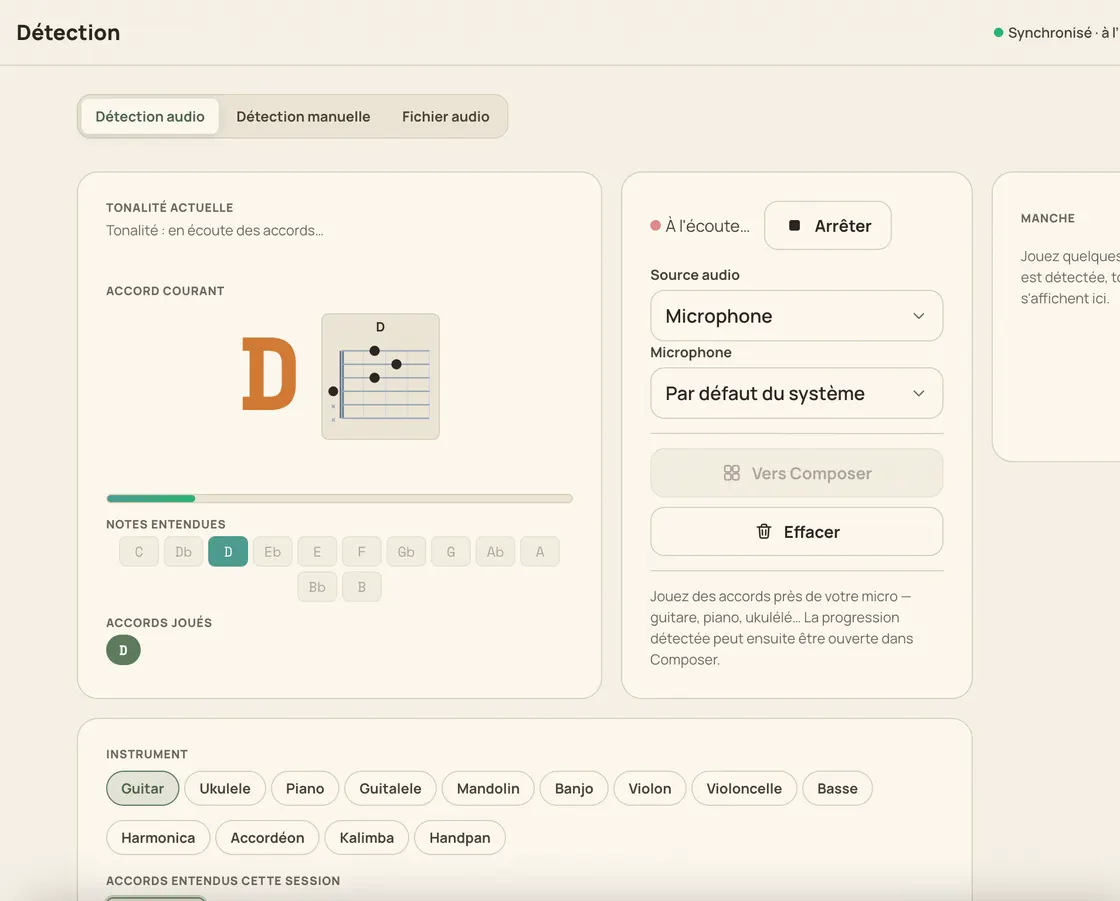
Chords are where a song starts, and Jam Jam handles both halves of the job: finding them and reading them. Play a chord on a guitar, a piano or anything else, and the chord detector names it live from your microphone (14 chord qualities on each of the 12 keys) while listing the notes it hears. Next to the name, a diagram draws the chord on the instrument you chose, from a guitar or ukulele neck to a keyboard. What you find goes into your chord notebook, where you can transpose it, work out a capo and export it as a PDF. Free, in your browser.
How to find the chords you play
-
Allow the microphone
Open the chord finder and grant mic access: the sound is analysed on your device and never uploaded.
-
Play a chord
Strum it on guitar, press it on a keyboard, or simply let a song play in a browser tab.
-
Read the name and the notes
Jam Jam names the chord live and lists the notes it hears, along with the key and the tempo of what you play.
-
See the fingering, then keep it
A diagram draws the chord on the instrument you picked, and the progression goes into your chord notebook: transposition, capo and PDF export included.
Chords you can find, read and reuse
Named live, from any source
Your microphone or a browser tab’s audio: play a chord, or let a song run on your computer, and it is named as it sounds.
168 chords, on your device
14 chord qualities across the 12 keys, read by a real embedded model rather than simple templates: computed in your browser and never sent online.
A diagram for your instrument
The same chord is drawn on a guitar or ukulele neck, on a keyboard, or on a keyed instrument: with the voicing you prefer.
From a chord to a whole song
Keep what you find in your chord notebook, then transpose it, work out the capo position and export the whole song as a PDF.
Why find your chords here
- Chords named live from the mic, or from a browser tab
- The notes heard, the key and the tempo, all at once
- Chord diagrams drawn for the instrument you play
- Free, private (on-device audio), no sign-up
A chord is only worth finding if you can keep it: the Jam Jam notebook imports from 23 tab sites, transposes in one tap, works out the right capo among 13 positions and exports a vector PDF you can import back later. In the browser, and offline in the Android app.
Open the chord finder →More Jam Jam tools
Chords FAQ
How do I find the chords of a song?
Play it, or let it play in a browser tab, and Jam Jam names each chord it hears in real time. You can then keep the whole progression in your free chord notebook.
Can I see how a chord is played?
Yes. Every chord comes with a diagram drawn for the instrument you chose: a fretted neck for guitar or ukulele, a keyboard for keyed instruments.
Which chords are recognised?
Major, minor, seventh, suspended and far more complex ones: 14 chord qualities across all 12 keys. 168 chords recognised, computed on your own device.