 Jam Jam
Free · no sign-up · in your browser
Free online audio mastering, in your browser
To master a song online for free, with no sign-up, open Jam Jam Mastering in your browser and drop a WAV, FLAC, MP3 or OGG mix. Automatic mastering sets EQ, de-esser, stereo width, glue compression and loudness, and explains each choice. Compare at equal loudness, aim at -14 LUFS with a -1 dBTP ceiling, then export a 24-bit WAV.
Opens in your browser, with no sign-up. Nothing to install.
What to know
- Free and with no sign-up: open the page, drop a file, master it and download the WAV without creating an account. The calculation runs in your browser and the file never leaves your device.
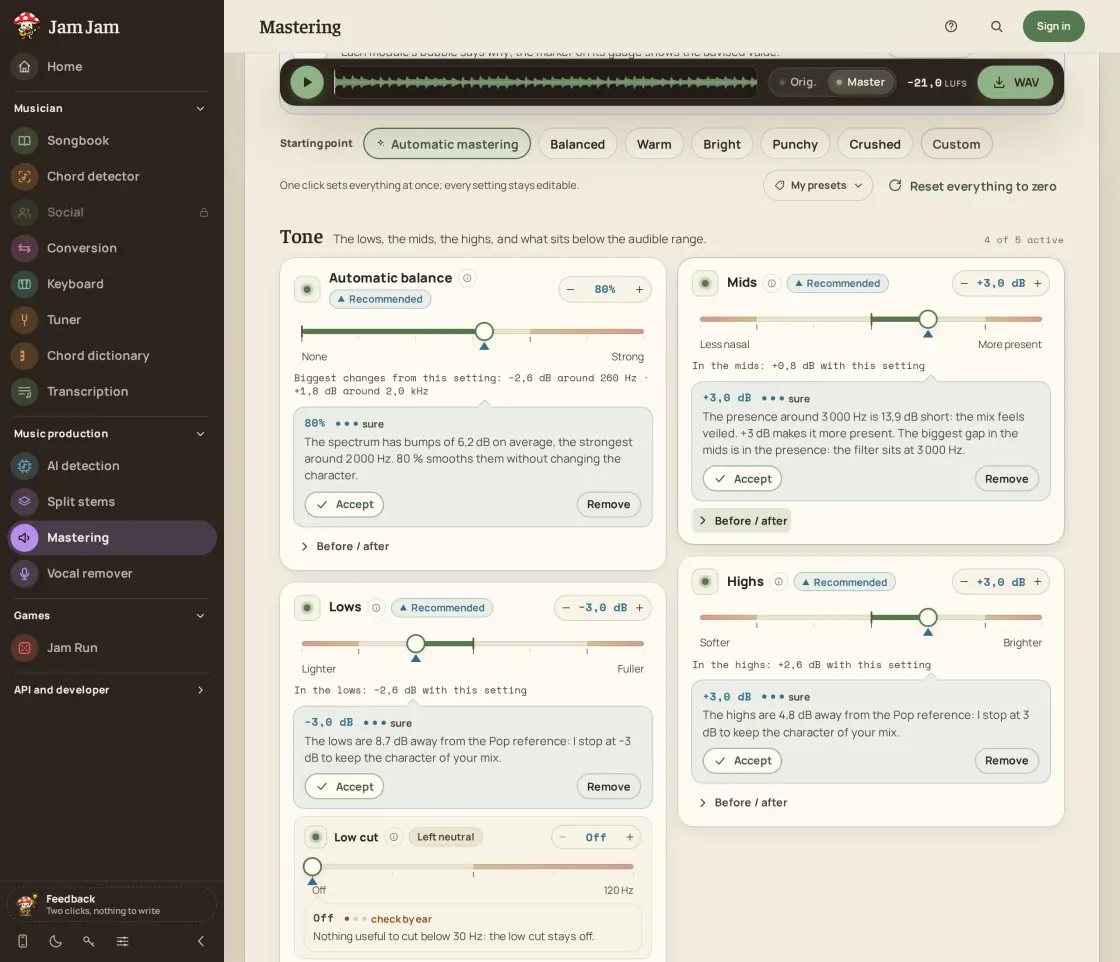
- Automatic mastering sets each setting and says why in a bubble; every setting can be accepted, adjusted, removed or restored.
- The chain: low cut and high cut, 9-band automatic EQ, tone controls with adjustable frequencies, air, de-esser, glue compressor, stereo width, mono bass, tape or tube warmth, and a look-ahead true-peak limiter with an adjustable ceiling.
- A switch toggles between Original and Mastered, the “At equal loudness” option (off by default) evens out their volume, and listening targets by platform (Spotify, YouTube, Apple Music, Deezer, podcast, club) show how far the track is from each one in LUFS.
- Hum filter (50 Hz, 60 Hz or automatic) and hiss reduction; WAV export at 16 or 24 bits with TPDF dither, for files up to 10 minutes. The same engine is also available through a REST API and an MCP server.
- Stems mixing: per-stem EQ, compression, transient shaping, de-esser, hiss and hum reduction, pan, width and room, hall or echo sends, an automatic mix, then mastering of the mixdown. Free to try.
How to master a track for free
-
Drop your track
Drag in a finished mix as WAV, FLAC, MP3 or OGG, up to 10 minutes. It is read and analysed on your device, nothing is uploaded.
-
Let it propose, or start from a preset
Automatic mastering sets each setting and explains why, and you accept, adjust or remove each choice. You can also start from Balanced, Warm, Bright, Punchy or Crushed, or from zero.
-
Compare at equal volume and aim at a target
Switch between Original and Mastered, turn on “At equal loudness” to judge the sound and not the volume, listen to the highlighted passages of the track, and pick the listening target (Spotify and YouTube, Apple Music, Deezer, podcast, club) to see how far you are from it.
-
Download your WAV
Choose 16 or 24 bits, both with dither. The file is built on your device with the settings as they were when you clicked.
What you control
Each setting has its own on/off switch, and you can bypass it to hear what it adds. Tone: automatic balance, lows, mids and highs with adjustable frequencies, plus air. The de-esser tames harsh "s" sounds and stinging cymbals at a centre frequency you choose. Cohesion is a bus compressor that glues the mix together, and Loudness adds a compressor and gain. Stereo width goes from -100% to 150%, with Mono bass to keep the lows in the centre. Warmth adds tape or tube saturation, and Destruction adds deliberate clipping, at zero until you raise it. A low cut, a high cut, a hum filter and hiss reduction clean the recording, and a look-ahead true-peak limiter with an adjustable ceiling closes the chain. Sliders go up to 150%, and everything beyond 100% is tinted so you know you are pushing.
Automatic mastering that explains itself
One click on Automatic mastering listens to your track and places a recommended marker on every gauge. A bubble on each setting says why, for example that the lows sit several decibels from a reference, and the passages of the track that motivated the choice are highlighted. You accept, adjust, remove or restore each value, so the proposal is a starting point and never a hidden decision. Animated help diagrams explain each measure, such as perceived loudness, true peak and stereo correlation.
Listen fairly, aim at a platform
A louder version always sounds better, so the “At equal loudness” option, off by default, turns down the louder of the two versions (Original and Mastered) so you judge the sound and not the volume. The listening target shows where the track will be played and how many decibels away it is: Spotify and YouTube at -14 LUFS, Apple Music at -16, Deezer at -15, podcast at -16 and club at -9, always with a true-peak ceiling of -1 dBTP. Spotify and Apple Podcasts publish their figure; for Apple Music and Deezer the values are observed by third parties, and the tool says so. Live meters show perceived loudness (LUFS), true peak, punch, dynamics, stereo correlation and mono loss.
| Target | Level | True-peak ceiling | Origin of the figure |
|---|---|---|---|
| Spotify, YouTube | -14 LUFS | -1 dBTP | published by Spotify |
| Apple Music | -16 LUFS | -1 dBTP | observed by third parties |
| Deezer | -15 LUFS | -1 dBTP | observed by third parties |
| Podcast | -16 LUFS | -1 dBTP | published by Apple Podcasts |
| Loud, club | -9 LUFS | -1 dBTP | Jam Jam’s own value |
Master through the API and the MCP server
The same engine renders files on the server through a REST API: POST /api/v1/mastering/jobs takes a file and one of five built-in presets (or your own settings), you follow the job and download a 16-bit, 24-bit or 32-bit float WAV, 200 MB and 10 minutes at most. An API key comes from a free account. It is also available to assistants as the jj_master_audio tool of the MCP server.
Mix a song from stems
Advanced Mastering mixes a song from its stems (vocals, drums, bass, instruments) before you master it. Each stem gets its own low and high cut, hum and hiss reduction, expander, EQ, compression, transient shaping and saturation, a de-esser for voices, plus volume, mute, solo, pan, width and room, hall or echo sends. An automatic mix proposes a balance and explains it, and a finished song can be split into stems first (that step runs on your device first and on Jam Jam’s servers only as a fallback; it needs an account). Export the mixdown as a 24-bit WAV, then master it. Free to try, Premium for intensive use.
Mastering cannot rescue a poor mix: it balances and prepares a finished track. If something is wrong inside the mix, fix it there, then come back. Simple mastering processes one stereo file at a time; to work on separate tracks, use the stems mixer.
Master a track →More Jam Jam tools
Frequently asked questions about Jam Jam Mastering
Is Jam Jam mastering really free?
Yes. Mastering a track in your browser is free and needs no sign-up: drop a file, adjust, listen and compare at equal volume, then download your WAV at 16 or 24 bits.
Is my file uploaded to a server?
Not by the web tool: your browser reads, analyses and processes the file on your device. Mastering through the API does send the file to the Jam Jam server, which deletes it as soon as it is decoded. Splitting a finished song into stems runs on your device first, without the file leaving it, when your browser and device allow it; otherwise it falls back to Jam Jam’s servers (account required); dropping your own stems sends nothing.
Do I need an account?
No. You can master a track and download the WAV without creating an account. You need one, for example, to create an API key.
Which files and how long?
WAV, FLAC, MP3 or OGG, up to 10 minutes. You download a 16-bit or 24-bit WAV, both with dither. When you can, start from the WAV of your mix rather than an MP3.
What loudness should I aim for?
It depends where the track will be played: Spotify and YouTube -14 LUFS, Apple Music -16, Deezer -15, podcast -16, club -9, with a -1 dBTP true-peak ceiling. Spotify and Apple Podcasts publish their figure, the others are observed by third parties. The target is a marker: the Loudness setting decides the actual level.
Can I master through an API?
Yes. The REST API offers the main settings of the tool (eight modules), five built-in presets and your own saved presets, with curl, Python and Node examples and an MCP server for assistants. An API key is created from an account.
Does automatic mastering replace a mastering engineer?
It does the basic job well: balancing the spectrum, controlling sibilance and width, reaching a consistent level, and it explains each choice. It does not replace an engineer’s ear on a difficult mix, or a reworked mix. Always compare at equal volume.
What is true peak, and why a -1 dBTP ceiling?
True peak is the highest level the signal reaches between two samples once it is converted or encoded. It can exceed 0 dB even when no sample does, and distort in MP3 or AAC. Jam Jam’s limiter looks ahead and works on interpolated peaks, with an adjustable ceiling; -1 dBTP is the usual safe margin.
What does dither do when I export at 16 bits?
Dither adds a very low level of noise before the bit depth is reduced, so quiet passages and fade-outs stay smooth instead of turning grainy. Jam Jam exports WAV at 16 or 24 bits with TPDF dither.
What does the de-esser do?
It lowers harsh "s" and "sh" sounds and stinging cymbals only when they jump out, without dulling the whole top end. In Jam Jam you pick its centre frequency, and you can bypass it to hear what it removes.
Can it reduce hiss and hum?
Yes. The chain includes a hiss reduction stage and a hum filter at 50 Hz, 60 Hz or automatic. They clean up a recording, so listen to what they remove before you keep them.
Can I mix a song from stems?
Yes, with Advanced Mastering: you mix separate stems (vocals, drums, bass, instruments) with EQ, compression, transient shaping, de-esser, pan, width and room, hall or echo sends, then you master the mixdown. A finished song can be split into stems first, on your device when your browser and device allow it, otherwise on Jam Jam’s servers (account required); dropping your own stems stays possible without an account.