 Jam Jam
Free · works in your browser · no sign-up
MP3 to chords: find the chords of an MP3, free and unlimited in your browser
Drop an MP3: time-stamped chords, key, tempo and structure, for free and with no limit in your browser.
- Free and unlimited in your browser
- No account
- Nothing to install
In short
Jam Jam Detection finds the chords, key and tempo of a song. It is free and unlimited in your browser, with no account: drop an audio file or play into the mic. To get the chords of an mp3, drop the file into the drop zone or into the Audio file tab of Detection. A chord model goes through the whole track and returns time-stamped chords, key, tempo and sections. Your browser does the calculation with no limit, and our server takes over when it is free; on mobile, the file is analysed on your phone or on our server in France.
- 168 chords recognised: 14 qualities across all 12 keys, the same model on web and mobile.
- Mobile app: mp3, m4a, aac, wav, flac and ogg; web: anything your browser can decode.
- Server option: the working file is deleted within 72 hours at the latest.
- Chord, key and tempo detection in the browser: free and unlimited, with no account.
You have the track as an mp3, but not its chords. Drop the file into the Audio file tab of Jam Jam detection: a BTC model (an embedded chord transformer) goes through the whole thing and returns time-stamped chords, an estimated key, the tempo and the song structure in sections, with the repeats it spots. 14 chord qualities across all 12 keys, 168 chords in total. Your browser does the calculation, with no limit. If our server is free, it takes over to go faster. On the phone, the file is analysed on your phone or on our server in France. A file handled by our server comes back with the chords and the lyrics faster and is deleted at the latest within 72 hours; the result stays in your song. One tap then sends the song to your chord notebook, where you edit it, transpose it and export it as a PDF.
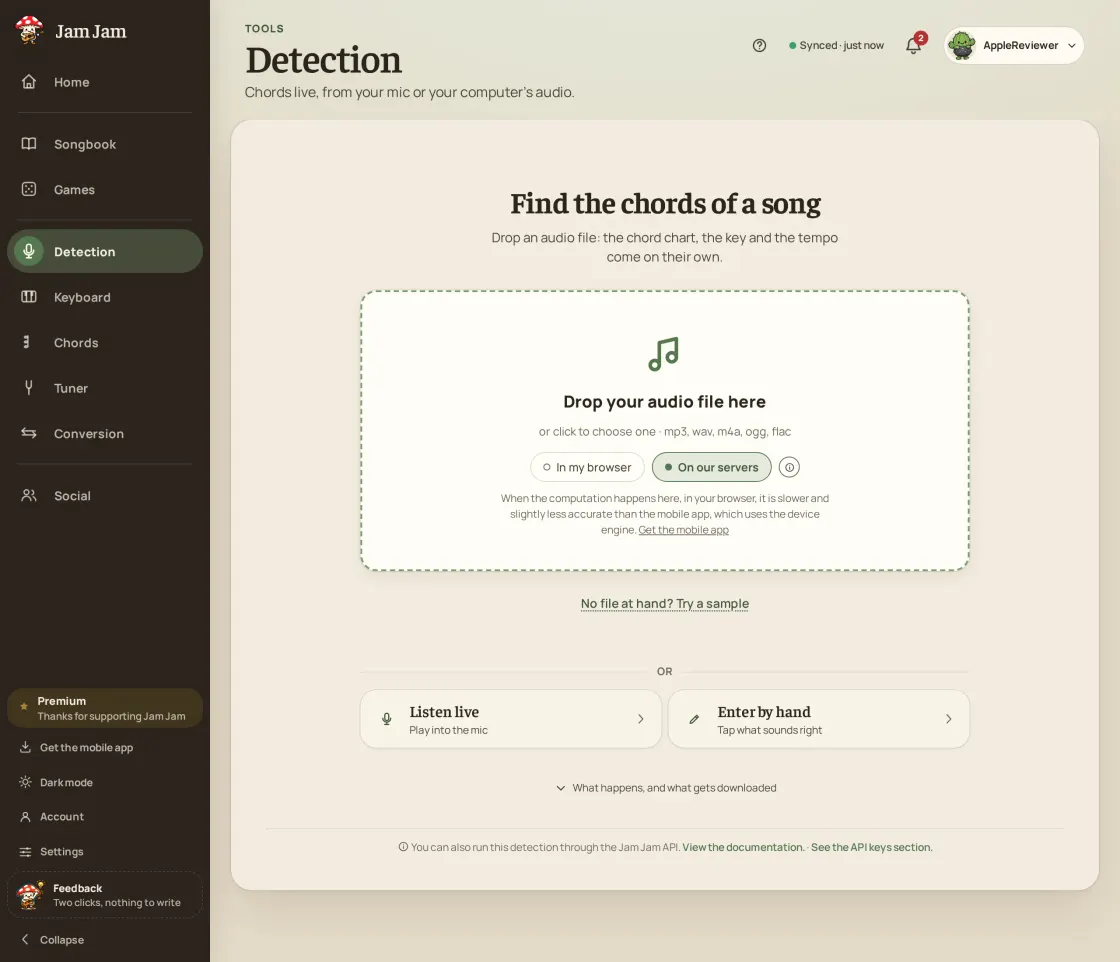
How to get chords from an audio file
-
Drop your file
Drag in an mp3, m4a, wav or flac, then pick where it is analysed: your own device, or our server for speed.
-
Let the model listen
The BTC model goes through the whole track and pulls out time-stamped chords, the key and the tempo.
-
Move through the timeline
Tap any chord on the timeline and playback jumps there, so you can check each passage by ear.
-
Send it to your notebook
One tap and the song lands in your notebook, title pre-filled, ready to transpose and export as a PDF.
Your file, your call
Your browser calculates, our server speeds things up
Your browser does the calculation, with no limit. If our server is free, it takes over to go faster. On the phone, the file is analysed on your phone or on our server in France, and the microphone is never sent anywhere. A file handled by our server is deleted at the latest within 72 hours; the result stays in your song.
A real chord model
A bidirectional BTC transformer, fed by a CQT front-end at 22,050 Hz over 144 bands, recognises 14 qualities across the 12 keys: 168 chords. The same model on web and mobile.
More than a chord grid
You also get the estimated key, the tempo in BPM and the section structure with its detected repeats: enough to understand the track, not just replay it.
The song keeps going
The analysis is not a throwaway result: it becomes a song in your notebook, editable, transposable from −6 to +6 semitones and exportable as a PDF.
Why this analysis
- Time-stamped chords, key, tempo and sections in one pass
- 14 chord qualities on the 12 keys: 168 chords recognised
- Clickable timeline: tap a chord and playback jumps there
- On web, Android and iOS (TestFlight beta): the microphone is never uploaded

An online analyser hands you a grid and stops there. Here the track you drop becomes a song in your notebook: you fix a doubtful chord, transpose it for your voice, ask for the most comfortable capo, add the lyrics, export a PDF for rehearsal. The key it reads can also lock the online keyboard, and the diagrams follow the instrument you play. That chain (file, notebook, keyboard, PDF) is the difference, not the recognition alone.
Analyse an audio file →Related guides
More Jam Jam tools
Audio file chords FAQ
Is my file uploaded to a server?
On the web, your browser does the calculation, with no limit. If our server is free, it takes over to go faster. On mobile, the analysis runs on your phone or on our server in France, and the screen always says which one is running. A file handled by our server is deleted at the latest within 72 hours (the result stays in your song). It is free and needs no sign-up either way.
Which formats can I drop?
On the web, anything your browser can decode. In the mobile app: mp3, m4a, aac, wav, flac and ogg. You drop the file as it is, with no conversion first.
Does it work on a phone?
Yes: on the web, on Android and on iOS (TestFlight beta), with the same model. The mobile app can also transcribe lyrics, and keeps the history of your analysed files so you can reopen a result without running the analysis again. Free, like the rest. In the browser, chord, key and tempo detection is free and unlimited, with no account. On your phone the calculation is free and unlimited too; the mobile app only counts the analyses sent to our server, each week (details on the Premium page).
Is there a free chord detector with no sign-up that accepts audio files?
Yes, Jam Jam. Drop an mp3, m4a, wav or flac: you get the time-stamped chords, the key and the tempo, for free, with no account, in your browser.
How do I find the key of a song from a recording?
Drop the recording into Detection: the estimated key appears with the chords, in the same pass. It is an estimate: a song that changes key, or a major and its relative minor, can be confused. Check by ear on the timeline.
How do I find the tempo (BPM) of an audio file for free?
Drop the file: the tempo in BPM is shown with the chords and the key. If it is double or half of the real tempo, fix it in one tap (half or double). Tap a few beats to check.
Can I find the chords of a video?
Yes: play the video in a browser tab and pick that tab’s sound in the mic tab of Detection (on desktop browsers that allow it). Detection does not analyse a YouTube link, it listens to the sound. Or extract the audio and drop the file here.
Can I analyse as many MP3 files as I want?
In your browser, yes: the calculation is free and unlimited, with no account. Our server can take over when it is free to go faster; when its free allowance is used up, your browser does the calculation. On your phone the calculation is free and unlimited too; the mobile app only counts the analyses sent to our server, each week (details on the Premium page).