 Jam Jam
What the API does
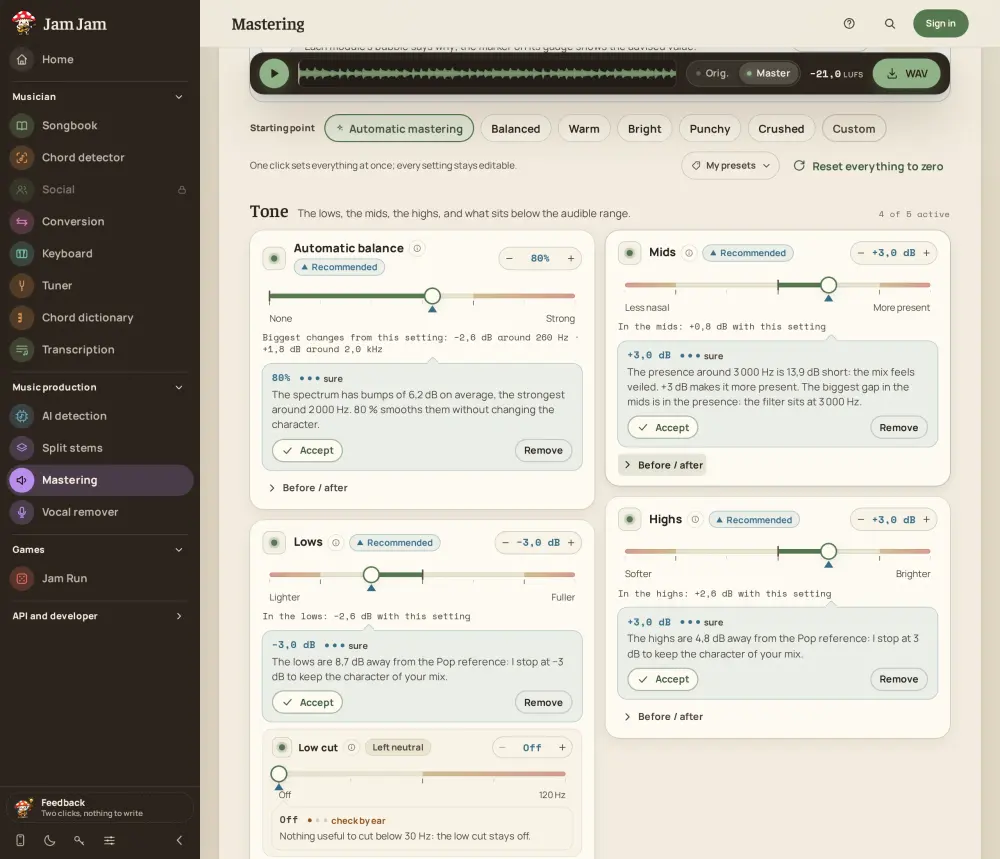
The /mastering family of Jam Jam’s REST API renders an audio file with a preset: it balances the tone, tames sibilance, sets the stereo width and brings the level to a loudness target (streaming, Apple Music, Deezer, podcast or club), with the settings of the web tool at jam-jam.org/app/mastering. The OpenAPI 3.1 contract is at jam-jam.org/api/v1/openapi.json and the reference is on jam-jam.org/developers. A file is 200 MB and 10 minutes at most, mono or stereo (beyond two channels the first two are used), and is processed at 48 kHz. The output is a WAV, 16-bit (wav-pcm16, the default) or 32-bit float (wav-f32); the API does not offer 24-bit. The source file is deleted as soon as it is decoded and the result is kept for 24 hours. A server render is reproducible (same file, same settings, same engineVersion), but not guaranteed to match the browser export bit for bit.
Get a key and check your access
Create an account on jam-jam.org, open Settings then API keys (jam-jam.org/app/prefs/api-keys) and create a key with the mastering:read and mastering:write scopes. The key starts with jj_live_, is shown only once, and an account can hold five. Keep it in the JAM_JAM_API_KEY environment variable, never in a repository or on a shared command line. Rendering a file through the API (POST /mastering/jobs) is open to every account: 3 renders per ISO week with a free account, on the same counter as the web tool, and no cap with Premium. Reading the contract and listing or saving presets is open to every account too.
Read the live contract
GET /mastering/capabilities needs no key. It returns the engine version, the range and step of each setting, the loudness targets, the built-in presets and the limits, and with a key it adds renderAllowed and your counter balance. Read it instead of hard-coding the bounds. Five built-in presets are read-only and used as preset=builtin:<id>: builtin:balanced, builtin:warm, builtin:bright, builtin:punchy and builtin:crushed. You can also save up to 50 presets of your own (a name of 60 characters at most) with POST /mastering/presets and call them by id.
Read the contract (no key needed)
curl https://jam-jam.org/api/v1/mastering/capabilitiesRender a file with curl
The flow is the one of every Jam Jam job: a POST that answers 202, polling until the end, then the download. The Idempotency-Key header (16 to 80 characters among A-Z, a-z, 0-9, _ and -) is required on every write: replaying the same key with the same body returns the same job without a second charge. The job goes through queued, decoding, analyzing and rendering, then ends as done, failed, cancelled or expired, and once done it carries a report with the integrated loudness (LUFS) and the true peak (dBTP) before and after. An account has one active render and three waiting at most. The examples repository ships the same steps as numbered scripts, curl/09-mastering-capabilities.sh to curl/14-mastering-delete.sh.
Render with a built-in preset, follow the job, download the WAV
# 1. Upload the file with a built-in preset (Idempotency-Key is required)
curl -X POST https://jam-jam.org/api/v1/mastering/jobs \
  -H "Authorization: Bearer $JAM_JAM_API_KEY" \
  -H "Idempotency-Key: $(uuidgen)" \
  -F [email protected] -F preset=builtin:warm -F format=wav-pcm16
# The 202 answer carries the job "id": JOB_ID=<that id>

# 2. Follow the job, honouring Retry-After, until "status" is "done"
curl https://jam-jam.org/api/v1/mastering/jobs/$JOB_ID \
  -H "Authorization: Bearer $JAM_JAM_API_KEY"

# 3. Download the mastered WAV
curl -o mix-master.wav https://jam-jam.org/api/v1/mastering/jobs/$JOB_ID/result \
-H "Authorization: Bearer $JAM_JAM_API_KEY"Python and Node
These two snippets condense python/mastering_lib.py and javascript/mastering-lib.mjs from the examples repository github.com/titouannwtt/jam-jam-api-examples (MIT licence): Python 3.10 or later with requests, Node 20 or later with no dependency. The full scripts add a readable message for each HTTP code and are run with python mastering.py master mix.wav --preset builtin:warm or node mastering.mjs master mix.wav --preset builtin:warm.
Python (3.10 or later, requests)
import os, time, uuid, requests

API = "https://jam-jam.org/api/v1"
HEADERS = {"Authorization": f"Bearer {os.environ['JAM_JAM_API_KEY']}"}
FINAL = ("done", "failed", "cancelled", "expired")

# 1. Upload the file with a built-in preset. Idempotency-Key is required.
with open("mix.wav", "rb") as audio:
    res = requests.post(
        f"{API}/mastering/jobs",
        headers={**HEADERS, "Idempotency-Key": str(uuid.uuid4())},
        data={"preset": "builtin:warm", "format": "wav-pcm16"},
        files={"file": ("mix.wav", audio)},
    )
res.raise_for_status()
job = res.json()

# 2. Poll, waiting as long as the server asks.
while job["status"] not in FINAL:
    time.sleep(int(res.headers.get("Retry-After") or 2))
    res = requests.get(f"{API}/mastering/jobs/{job['id']}", headers=HEADERS)
    res.raise_for_status()
    job = res.json()
if job["status"] != "done":
    raise SystemExit(f"mastering {job['status']}: {job.get('error')}")

before, after = job["report"]["before"], job["report"]["after"]
print(f"LUFS {before['integratedLufs']} -> {after['integratedLufs']}")

# 3. Download the mastered WAV.
audio = requests.get(f"{API}/mastering/jobs/{job['id']}/result", headers=HEADERS)
audio.raise_for_status()
with open("mix-master.wav", "wb") as out:
    out.write(audio.content)
Node (20 or later, no dependency)
import { openAsBlob } from 'node:fs';
import { writeFile } from 'node:fs/promises';

const API = 'https://jam-jam.org/api/v1';
const headers = { Authorization: `Bearer ${process.env.JAM_JAM_API_KEY}` };
const FINAL = ['done', 'failed', 'cancelled', 'expired'];

// 1. Upload the file with a built-in preset. Idempotency-Key is required.
const body = new FormData();
body.append('file', await openAsBlob('mix.wav'), 'mix.wav');
body.append('preset', 'builtin:warm');
body.append('format', 'wav-pcm16');
let res = await fetch(`${API}/mastering/jobs`, {
  method: 'POST',
  headers: { ...headers, 'Idempotency-Key': crypto.randomUUID() },
  body,
});
if (!res.ok) throw new Error(`${res.status} ${await res.text()}`);
let job = await res.json();

// 2. Poll, waiting as long as the server asks.
while (!FINAL.includes(job.status)) {
  await new Promise((r) => setTimeout(r, (Number(res.headers.get('retry-after')) || 2) * 1000));
  res = await fetch(`${API}/mastering/jobs/${job.id}`, { headers });
  if (!res.ok) throw new Error(`${res.status} ${await res.text()}`);
  job = await res.json();
}
if (job.status !== 'done') throw new Error(`mastering ${job.status}: ${JSON.stringify(job.error)}`);

const { before, after } = job.report;
console.log(`LUFS ${before.integratedLufs} -> ${after.integratedLufs}`);

// 3. Download the mastered WAV.
res = await fetch(`${API}/mastering/jobs/${job.id}/result`, { headers });
if (!res.ok) throw new Error(`${res.status} ${await res.text()}`);
await writeFile('mix-master.wav', Buffer.from(await res.arrayBuffer()));Your own settings
Instead of a preset, send the settings as JSON in the settings field: exactly one of preset or settings. The format (MasteringSettingsV1) holds eight modules, each with a value and an enabled flag, a loudness target (streaming, apple, deezer, podcast or club) and normalize. Tone settings are in decibels and the others in percent, up to 150; a value outside its range or off its step answers 422 invalid-settings with one entry per problem. To reuse a set of settings, save it with POST /mastering/presets and pass its id in preset. Settings are copied at upload, so editing the preset afterwards does not change a job already started.
Send your own settings
{
  "modules": {
    "autoEq":   { "value": 50, "enabled": true },
    "lows":     { "value": 2, "enabled": true },
    "mids":     { "value": -0.5, "enabled": true },
    "highs":    { "value": -1.5, "enabled": true },
    "deEss":    { "value": 40, "enabled": true },
    "width":    { "value": 10, "enabled": true },
    "loudness": { "value": 45, "enabled": true },
    "destruct": { "value": 0, "enabled": false }
  },
  "target": "streaming",
  "normalize": false
}
Send your own settings
curl -X POST https://jam-jam.org/api/v1/mastering/jobs \
  -H "Authorization: Bearer $JAM_JAM_API_KEY" -H "Idempotency-Key: $(uuidgen)" \
-F [email protected] -F "settings=<samples/mastering-settings.json" -F format=wav-pcm16Master a whole folder in batch
The repository contains two batch scripts, python/mastering_batch.py and javascript/mastering-batch.mjs, that master a folder with one preset, one file after the other. Three choices are worth copying. Files are sent one at a time, because an account accepts one active render and three waiting. A file whose name-master.wav already exists is skipped, so you can rerun after an interruption. On a 429 with a short wait (five minutes at most) the script waits for Retry-After and replays the same file with the same idempotency key, and it stops on a 403 or on a long 429, because the next files would fail the same way.
Master a folder, one file at a time
python mastering_batch.py ~/Music/mixes --preset builtin:balanced --out masters
node mastering-batch.mjs ~/Music/mixes --preset builtin:balanced --out mastersErrors and quotas
Every error is an application/problem+json with a stable code you can test, and render responses carry the X-Mastering-Quota-Limit, X-Mastering-Quota-Remaining and X-Mastering-Quota-Reset headers. Premium accounts have no cap on the number of renders. On a free account, a 429 with the quota-exhausted code means the week’s renders are used up; any other 429 is a rate limit or a busy queue. A failed or cancelled render is not counted. Rendering a file through the API (POST /mastering/jobs) is open to every account: 3 renders per ISO week with a free account, on the same counter as the web tool, and no cap with Premium. Reading the contract and listing or saving presets is open to every account too.
| Status | Code | Meaning |
|---|---|---|
| 401 | Missing or invalid key. | |
| 403 | insufficient-scope | The key lacks the mastering:read or mastering:write scope. |
| 403 | premium-required | Rendering is not open to your plan (see renderAllowed in GET /mastering/capabilities). |
| 409 | not-ready | Result requested before the render is finished. |
| 410 | expired | The 24 hours are over: render again. |
| 413, 415, 422 | File too large, unsupported format, audio over 10 minutes or invalid settings (read errors[]). | |
| 429 | rate-limited | Too many requests, or a render already running and three waiting (client-quota), or a full queue (queue-full): wait Retry-After seconds and do not loop. |
The MCP server for assistants
The official MCP server @jam-jam/convert-mcp exposes Mastering to Claude Desktop, Claude Code, Cursor and other Model Context Protocol clients, and only shows the tools your key’s scopes allow. Six tools cover Mastering: jj_mastering_capabilities (no scope), jj_list_mastering_presets, jj_create_mastering_preset, jj_master_audio, jj_mastering_get_job and jj_mastering_cancel_job. jj_master_audio uploads a local file with a preset or inline settings and, with maxWaitMs, waits and downloads the result. You can then ask your assistant to master a file with the warm preset and tell you the loudness before and after. Put the key in the environment, never on a command line.
MCP client configuration
{
  "mcpServers": {
    "jam-jam": {
      "command": "npx",
      "args": ["-y", "@jam-jam/convert-mcp"],
      "env": { "JAM_JAM_API_KEY": "jj_live_..." }
    }
  }
}
To understand what the settings do and which loudness to aim for, read our guide to mastering a song for free.
Frequently asked questions about the mastering API
Is Jam Jam’s mastering API free?
Yes. With a free account, POST /mastering/jobs renders 3 files per ISO week, on the same counter as the web tool; a failed or cancelled render is refunded. Premium removes the cap. Reading the live contract and managing your presets costs nothing.
What are the file limits?
200 MB and 10 minutes at most, mono or stereo. The result is a 48 kHz WAV, 16-bit, 24-bit or 32-bit float, kept for 24 hours.
Is the result identical to the browser’s?
It is reproducible on the server (same file, same settings, same engineVersion) but not guaranteed identical bit for bit to the browser export. The settings are the same.
Can I send several files at once?
An account has one active render and three waiting. For a folder, send the files one at a time with the batch scripts of the examples repository.
How do I use it with an AI assistant?
With the MCP server @jam-jam/convert-mcp: the jj_master_audio tool masters a local file and jj_mastering_get_job reads the loudness before and after.

The same engine is free to try in your browser, with your file staying on your device.